
How HDR Works
Increasing dynamic range increases the perception of resolution. Our eyes will perceive an image as clearer if the colors on the image have greater contrast, far more than they can perceive an increase in pixels. In fact, to actually perceive the improved resolution of 4k, you must view the screen from a distance of 3 screen lengths, or the perceived resolution will degrade. With increased dynamic range, however, you can perceive the clarity from a distance, much the same way that you might be able to see a candle on the other side of a dark field. Our eyes are wired to see these contrasts.

Our eyes are far better at perceiving the differences between dark shades, than between lighter ones. The image below shows this effect. The gray text on the left is 10% whiter than the black background, and the text on the white is ten percent blacker than the white background.

HDR leverages this, by compressing the highlights more than the shadows, and providing more detail in darker areas. This way, what is shown on the screen is closer to how your eyes would perceive a scene in real life.
HDR Technology
HDR is actually three advanced image technologies: Wide Color Gamut (WCG), higher sample precision, and the HDR transfer function.
Wide Color Gamut (WCG)
The human eye can perceive a wide range of colors, but the screens we use are limited as to what they can display. The color gamut in the image below, shows the colors a human eye can see and the colors different screens can display. The inner triangle, shows the colors that an HDTV is capable of displaying, and the outer triangle shows what UHDTV can display.
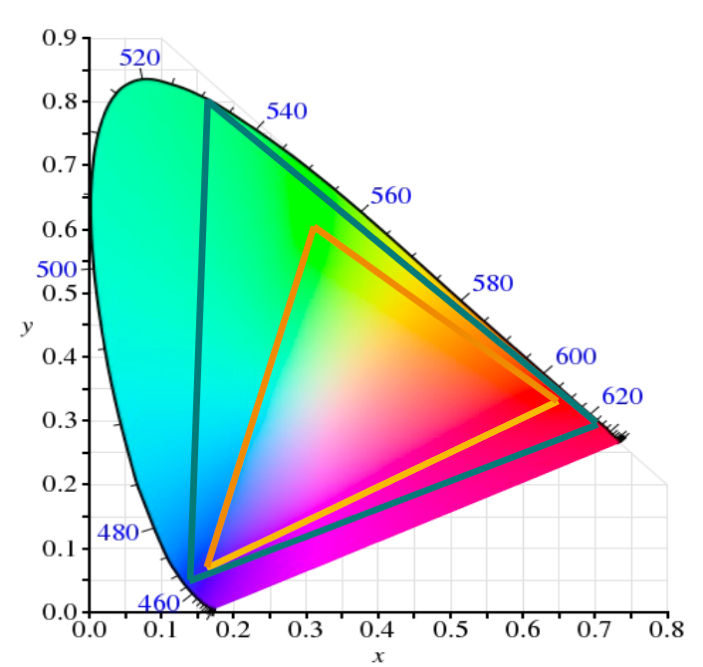
Screens essentially approximate the color you would see naturally. The green of highway signs is an example of a color that cannot be precisely represented on screen. You wouldn’t notice anything unusual about a highway sign on a TV show, but if you were to hold the image up next to a sign in real life you could quickly see it was a different color. HDR uses a Wide Color Gamut, in that it is able to show a wider range of colors than HDTV can, and therefore more accurately represent on screen what a scene would look like in person.
Color Volumes
The light we see is both a specific color, and a degree of luminance. Two colors can be identical, but we see them differently because one is “lighter” or “darker” than the other. The amount by which we can adjust the lightness or darkness of a color is called it’s Dynamic Range. It is important to remember that dynamic range isn’t about brightness, in the sense of a flashlight in your eyes being bright. The blacks are blacker, not dimmer; the whites are whiter, not brighter.
Dynamic range is measured in nits, and is shown on the color gamut on the z-axis. The image below shows the UHD and HD television Color Volumes. This is the same thing as the range of colors that a tv screen can represent, but also includes the amount of Dynamic Range each color can produce.
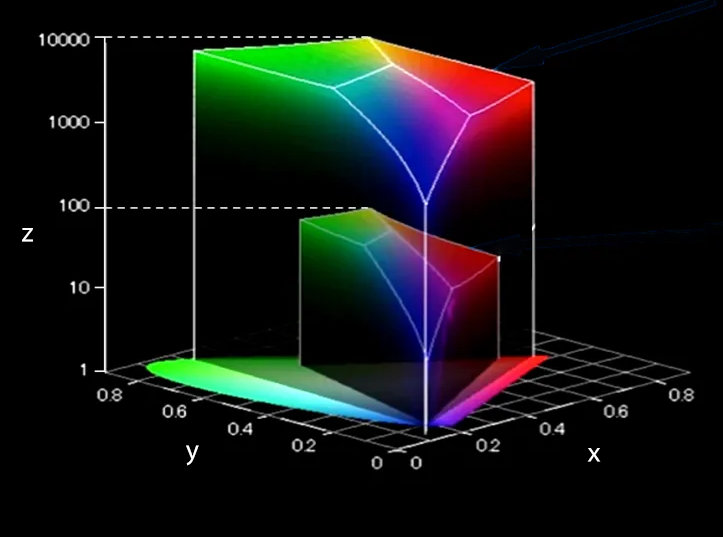
The dynamic range increases logarithmically, and the UHD volume can reach 10,000 nits, as opposed to the 100 nits possible on HDTV.
Higher Sample Precision
Most digital TV uses 8 bit sampling which can cause color banding, or “posterization”, on images that gradually fade. This is due to the color of each pixel being rounded to the nearest digital color level, creating the bands of color you see on the left of the below image, as opposed to the fade you see on the right. HDR and WCG exacerbate this issue.
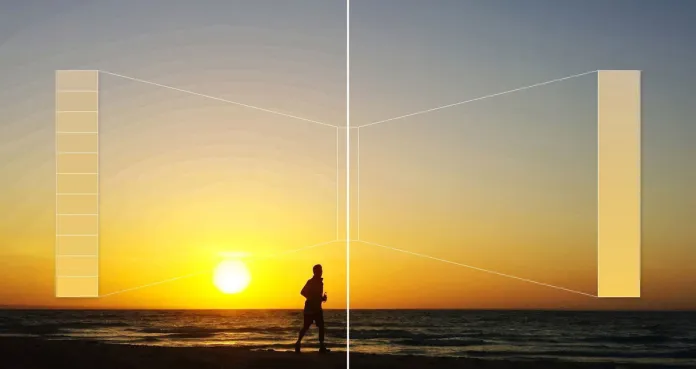
HDR uses 10-bits sampling which significantly improves the picture quality without increasing the amount of bandwidth used due to compression.
Transfer Function
A camera captures light from a scene and turns it into a digital signal. The digital signal is transmitted to a TV, and the TV turns the digital signal back to light, so the audience sees the scene. To do this, a display uses a transfer function.
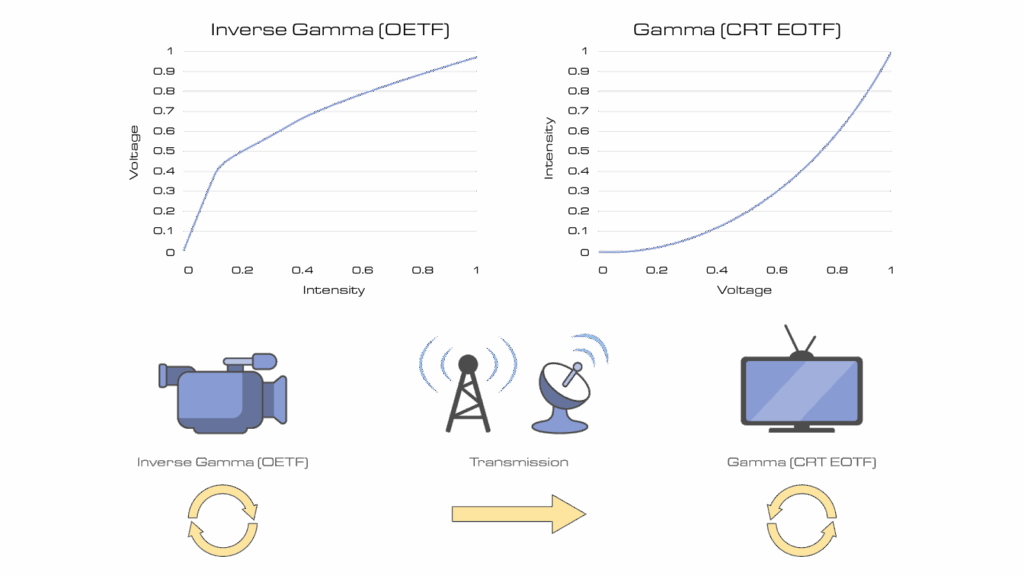
A transfer function defines how dynamic range is encoded and decoded in an image signal. OETF (Opto-Electronic Transfer Function) is used in cameras to convert light into a digital signal. EOFT (Electro-Optical Transfer Function) is used by a TV screen to convert the digital signals back to light. Specifically, they are mathematical curves that define how luminance is mapped from the digital inputs to the nit value of the display to accurately depict the image, while considering the capabilities of the display.
Cathode Ray Tube displays were the universal technology for some time, and they used a power function to map the values. The brightest a CRT screen could get was 100 nits, so brightness levels above 100 were clipped, meaning brighter values would appear to have the same brightness, and darker areas would be more difficult to discern.
HDR uses a logarithmic function instead of a power function to more accurately display highlights while preserving shadowy details. The ITU defines two different HDR transfer functions: Perceptual Quantization, and Hybrid Log Gamma.
Perceptual Quantization
Perceptual Quantization (PQ) is an HDR transfer function that encodes absolute brightness values to match how the human eye perceives light. It allocates more digital steps to darker tones, where our eyes are more sensitive to differences, and fewer to bright areas, where we’re less sensitive. This allows extremely accurate shadow detail while preserving highlight range up to 10,000 nits. PQ delivers a precise, reference-quality image, but requires metadata and displays capable of interpreting those absolute brightness levels. HDR 10, the most common HDR format in the market, uses PQ to optimize HDR view.
Hybrid Log Gamma (HLG)
Unlike Perceptual Quantization, which encodes absolute brightness, HLG uses a relative curve that adapts to each display’s own brightness range. It combines a traditional gamma curve for dark tones with a logarithmic curve for highlights, allowing a single signal to look good on both SDR and HDR screens without metadata—making it ideal for live television delivery.
PQ and HLG operate differently and are not seamlessly interoperable at the display. Each of them must be normalized before converting to the other.
Color Volume Mapping
A final key part of a transfer function is color volume mapping. TVs have different maximum brightness levels. Tone mapping ensure the incoming content is displayed correctly for a particular screen. HDR content can be mastered for 10,000 nits, but most TVs max out at 600-1,500 nits. Without tone mapping, highlights are clipped and shadows lose detail. Tone mapping can be static, where it is set once for the entire video; or dynamic, where it updates frame by frame or scene by scene. While static tone mapping is simplest, dynamic tone mapping provides the better picture.
| Feature | Static Metadata | Dynamic Metadata |
| Adjustment Type | One-time, applies to the whole video | Adjusts for each scene or frame |
| Flexibility | Limited – doesn’t adapt to changing brightness | Adapts scene-by-scene |
| Example Metadata | MaxCLL (Maximum Content Light Level), MaxFALL (Maximum Frame-Average Light Level) | Scene-by-scene tone mapping, color grading adjustments |
| Supported Formats | HDR10 | Dolby Vision, HDR10+, Advanced HDR by Technicolor (SL-HDR2/3) |
| Best Use Case | Basic HDR content (streaming, Blu-ray) | High-quality HDR (streaming, premium content) |
AHDR by Technicolor
Broadcasters want to support a compelling HDR experience to capable devices but face some challenges. Bandwidth constraints can make broadcasting in UHD a challenge, particularly as multiple formats exist with different requirements. Broadcasters must also ensure they continue to serve legacy SDR viewers, so must find a way to deliver both formats over a limited pipe.
Sinclair has opted to use AHDR by Technicolor. AHDR is not just another HDR format, but a carriage mechanism of HDR10 or HLG with dynamic image improvement. It produces a single stream of bandwidth efficient video that is broadcast to all receivers, but contains HDR metadata allowing new HDR displays to see the best visual experience, which ensuring SDR viewers are not left in the cold.
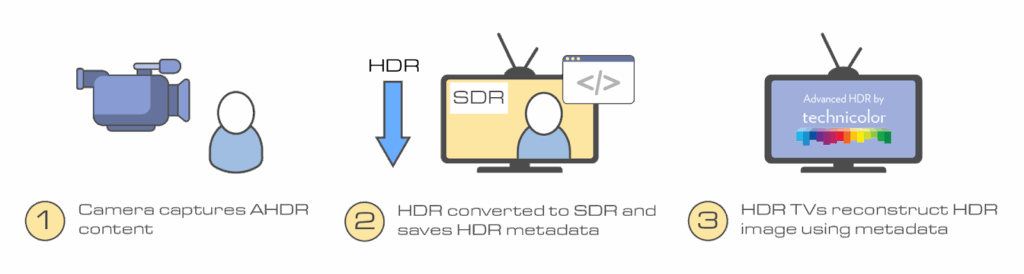
In AHDR, a camera captures HDR content and down converts it to SDR, while capturing the HDR information as metadata. The content is then sent through the broadcast chain as SDR, enabling low bit usage and backwards compatibility with SDR televisions. HDR televisions can use the encoded HDR metadata to reconstruct the HDR content.
This means the content can be used by live broadcasts, unlike Dolby Vision which is limited to pre-produced content. It uses a PQ Transfer function, and the tone mapping is dynamic and adjusts the content per frame. Its metadata is dynamic with AI-based conversion, ensuring the best possible picture is seen on screen in each scene, while maintaining backwards compatibility.
Key Features
- Real-time dynamic tone mapping, ideal for live TV and sports
- SDR-to-HDR conversion using AI, so broadcasters can deliver one SDR signal with HDR metadata
- Works across multiple display types without requiring separate HDR/SDR versions
- Doesn’t need pre-encoded metadata—adapts on-the-fly based on content analysis
See the World as it Is
HDR expands the visual range of content in a way that aligns with how our eyes see the world. By increasing dynamic range, leveraging a wider color gamut, using higher precision sampling, and employing advanced transfer functions, HDR delivers deeper detail in shadows, more nuance in highlights, and overall greater image clarity than traditional video formats can achieve.
Understanding how these elements work together helps demystify why HDR looks so compelling on modern displays and why it’s become an essential part of high-quality video production and viewing.